One spec says 8GB. The other says 256GB. Both are “memory,” both are measured in gigabytes, and the salesperson says “more is better” about both — which is how people end up paying for the wrong one. A phone with 128GB can still be slow. A laptop with 16GB can still say “storage full.” If you’ve never fully understood why, it’s because nobody ever explained the kitchen.
The kitchen analogy (this is the whole article):
Your device is a kitchen.
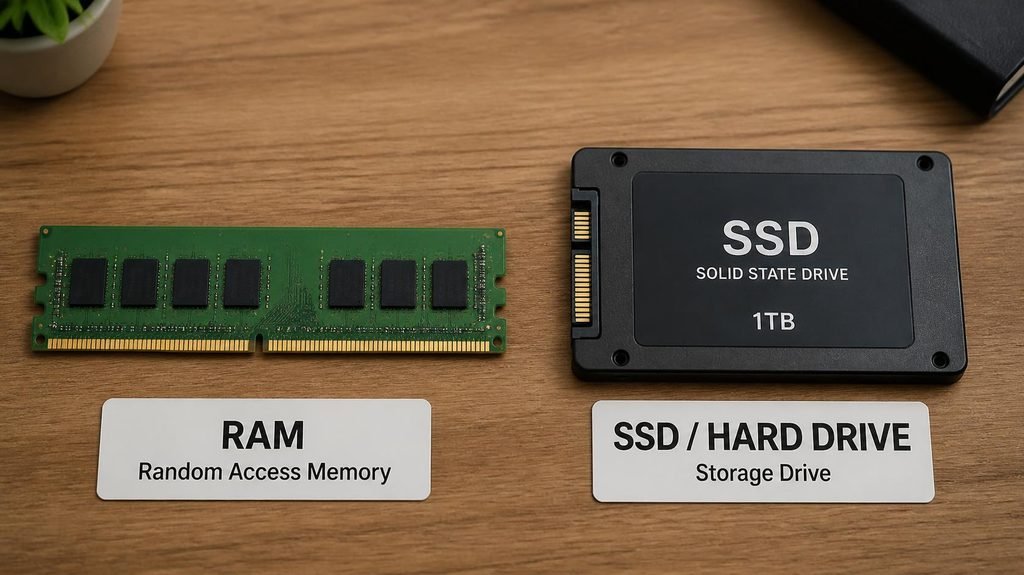
Storage is the pantry and refrigerator. It’s where everything is kept long-term: your photos, your apps, your downloads, the operating system itself. When the power goes off, the pantry keeps everything. Storage sizes are the ones you see on the box: 64GB, 128GB, 256GB.
RAM is the counter space. It’s the working area where everything currently happening lives: the app you’re using right now, the fourteen open browser tabs, the video you’re editing, the music playing behind it all. Big counter = many things cooking at once, smoothly. And here’s the catch: when the power goes off, the counter is wiped clean. RAM sizes are the smaller numbers: 4GB, 8GB, 16GB.
That’s the entire difference. Everything else is consequences — and the confusions below are all just the pantry and the counter getting mixed up.

- TEAMGROUP T-CREATE EXPERT 32GB KIT 2 X 16GB DDR5-6000 PC5-48000 CL30 DUAL CH
Confusion #1: “My phone has 128GB and it’s still slow!”
Of course it can be — 128GB describes your pantry, not your counter. Slowness usually comes from a small counter (not enough RAM for what’s open) or a nearly-full pantry (the system gasping for working room). If you don’t know which one you have, you’re fixing the wrong problem.
Confusion #2: “I deleted apps to make my phone faster.”
Deleting apps frees storage — which helps only if your storage was nearly full. If your problem is RAM (too much running at once), what helps is closing what’s running and restarting. People clean the pantry when the counter is the problem, then conclude “nothing works.”
Confusion #3: “More GB = faster. Period.”
No spec is “speed” by itself — but both can bottleneck it. A kitchen with a tiny counter forces you to cook one dish at a time no matter how big the pantry is. A pantry stuffed to 100% makes even simple recipes slow, because the system needs free shelf space to function (that’s the 80% rule: keep storage below ~80% full, permanently).
How much do you actually need? The honest grid:
RAM (counter space):
- 4GB — struggles with modern multitasking
- 8GB — fine for browsing, documents, streaming
- 16GB — comfortable for heavy multitab users, light creative work
- 32GB+ — video editing, 3D, virtual machines. Not for normal humans.
Storage (pantry):
- 64GB — tight; you’ll live in the cloud
- 128GB — the sweet spot for most people
- 256GB+ — photo/video collectors, gamers (modern games install 50–100GB each), offline pack-rats
- Budget-phone bonus: a microSD slot lets you expand the pantry later for cheap — a real advantage over fixed-storage flagships.
The plot twist inside the pantry: drive type.
Not all pantries work the same way. A hard drive (HDD) is a pantry where a slow butler walks to the basement and fetches one item at a time. An SSD is a magic shelf that hands you anything instantly. Same capacity, wildly different kitchens — which is why a $400 laptop with an SSD feels faster than a $1,200 laptop with an HDD. The full comparison (and the $40 swap that revives old machines) is in our SSD vs HDD guide.
Putting it all together:
Once you see counter vs pantry, a shocking amount of tech advice clicks into place: checking your RAM usage tells you if your counter is the bottleneck. Freeing up storage is pantry management. And the complete free revival routine for slow laptops is really just one question asked eight ways: is it the counter, the pantry, or the butler?
So the next time a salesperson says “this one has 256GB, so it’s really fast” — you now know that sentence is gibberish. The pantry doesn’t set the pace. The counter does. Buy both deliberately.
Affiliate link — “Earns commission at no extra cost to you.